Accessing NBCE Network via VPN Connection
Part 1 - Download and Install GlobalProtect (VPN Program) on Home Computer
- In a web browser open the page https://vpn.nbce.org.
- If it appears, accept the prompts that say the security certificate is not good or that the site is unsafe. It is perfectly fine, this is an internal website.
- Enter the VPN username and password that the IT department gave you.
- Download the appropriate GlobalProtect version depending on which version of Windows OS or Mac OS your PC is running. For most NBCE PCs, choose “Windows 64 bit GlobalProtect agent”.
- Install Global Protect.
- Post-installation info:
- Portal address is: vpn.nbce.org.
- The username and password are the same as what was used to log in above in #3.
- Click Apply. Your login credentials will be saved and you will not have to enter them again. This will save the settings and connect you to the NBCE network via VPN.
Part 2 - To Connect or Disconnect to the VPN
- The GlobalProtect software is represented by a globe symbol typically near the clock on your computer. The VPN is not connected if there is a white “X” in a red circle in front of the globe. The VPN is connected if there is a shield in front of the globe.
- To connect or disconnect simply right-click on the GlobalProtect icon and select connect or disconnect.
Part 3 - Use Remote Desktop to Connect to the Remote Desktop Server
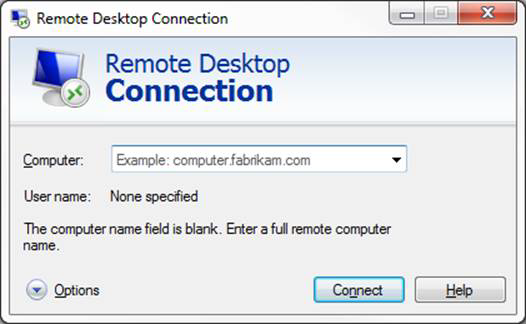
- Open the Start Menu, go to "Windows Accessories". Find and click on 'RemoteDesktop Connection' under "Windows Accessories".
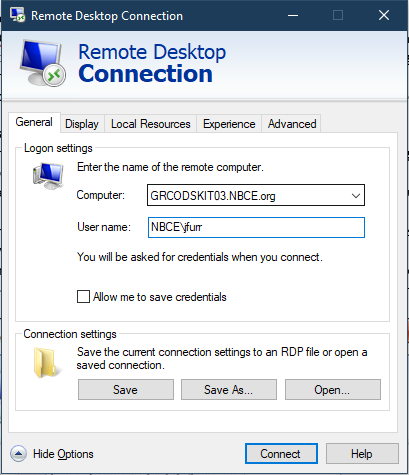
- In the Computer box, type in the name/address of the desktop you use at work. Please let IT know if you would like this set up.
- You may need to click the Options button to see the full Remote Desktop Connection options so that you can enter your password. Refer to the images below.
- Enter your NBCE username (email address) and password as shown below: NBCE\username and click the Connect button. The remote session should then load on your screen.
Having trouble? Submit a ticket at help.nbce.org to get help from IT!
Note: If you notice that some web sites or programs that use the Internet are not working properly, it may be due to GlobalProtect “locking them down” in order to force a secure connection to the NBCE network. Please let us know if you experience this. It is typically best to do only work-related activities on the computer while connected to VPN and save your personal browsing, etc. until you are disconnected from the VPN.
Was this article helpful?
That’s Great!
Thank you for your feedback
Sorry! We couldn't be helpful
Thank you for your feedback
Feedback sent
We appreciate your effort and will try to fix the article